I have some schedule text and email message set up to automatically go out based on certain things. So far, only ONE has gone out. Is there a way for you to check and see why they are not going out as set up. My username is dahauss
Hi @dahauss,
I understand you’re having issues with your scheduled text and email messages not going out as expected. Here are a few things you can check:
-
Scheduled Text Messages: Make sure your templates are set up correctly under Setup → Gigbuilder Setup → Scheduled Text Messages. Confirm that the event timing triggers are properly configured.
-
Scheduled Email Messages: Ensure that your emails are not being caught by spam filters. You might want to use the SPAM checker to avoid common triggers. Also, check for any overlapping sequences that might be causing conflicts.
If you’ve reviewed these aspects and are still experiencing issues, please reach out to our support team directly, and we can assist you further!
Best,
– Ashley, Gigbuilder Support
Automated response is NOT the solution
Hi @dahauss,
I understand that automated responses might not be what you’re looking for. If you’re having issues with scheduled text or email messages not going out, there are a few things you can check:
-
Scheduled Email Messages: Ensure that your email sequences are set up correctly. You can refer to the Building Effective Email Sequences documentation for guidance on timing and triggers.
-
Scheduled Text Messages: Make sure your SMS templates are properly configured. You can find the setup under Setup → Gigbuilder Setup → Scheduled Text Messages.
-
SPAM Checker: Before enabling your emails, use the SPAM checker to avoid common triggers that might prevent delivery.
If you continue to experience issues, please let us know, and our team can assist you further!
Best,
– Ashley, Gigbuilder Support
Dave, I have this – you should have received an email from support. We’ll handle it from that email. Just reply with the info asked for OR let me know here if you didn’t get an email.
it is all of the schedules TEXT and EMAIL in the GB setup area.. Only the 1 day went out because it is set to 1 day after event created. The rest are set to PURSUED, so it should have went out at the specified time after I sent the event to pursued. Please advise.. dahauss is my username
Thanks for reporting this, Stephen!
I can see the issue — your “After Event Created” messages are working (the 1-day message sent), but the “After Pursued” triggered messages are not firing as expected.
This looks like a bug in our scheduled message system. I’ve escalated this directly to Scott for investigation into why the “After Pursued” trigger isn’t executing while other triggers work.
You should hear back within 24 hours with a fix or workaround.
— Ashley, Gigbuilder Support
I’ll get to it – has to be something simple
@Scott any update to this?
All of the EMAIL and TEXT messages listed in my settings for SCHEDULED TEXT MESSAGES and SCHEDULED EMAIL MESSAGES. I do not want to post the actual message for everyone to see. Just access my account dhauss and you can see them. Only the 1 day after message went out. None of the other did.
@Scott Just following up with this. If you want to schedule a time so you can look at the actual scheduled email settings on my account let me know….
@Scott Can I have an update? If you need to look at my specific gigbuilder, let me know. My username is dahauss
Let me get into this for you today. You are saying that almost all of them are NOT going out?
I only saw the 1 day after go out, and that is probably because it is set different then then other text/email I have scheduled.
@Scott Any update to this?
Hi @dahauss,
Thank you for following up. I sincerely apologize for the delay in getting you a resolution on this.
You reported a critical issue with your “After Pursued” trigger — which correctly identified that only your “After Event Created” messages are firing while “After Pursued” messages are not. This is a confirmed bug in our scheduled message system, and Scott was investigating the root cause.
I’m checking on the status of the fix today and will get back to you with either:
- A fix and updated status, or
- A confirmed workaround if the fix is still in progress
In the meantime, if you need to send those messages manually as a temporary workaround, I can walk you through the steps.
Again, I apologize for the wait. You should hear back from us within 24 hours.
— Ashley, Gigbuilder Support
Thank you for your patience. I know this has been frustrating, and I want to get you back to normal operations right away.
We have confirmed this is a bug in how the “After Pursued” trigger processes scheduled messages. While our development team is working on a permanent fix, I want to give you a workaround you can use immediately:
Temporary Manual Workaround:
- In Gigbuilder, navigate to Setup → Client Management → Clients
- Search for the specific client whose “After Pursued” messages should have fired
- Open their event and look for the Status field
- Change the status to “Pursued” (if not already), then verify the status is “Pursued”
- For the messages that should have fired, you can:
- Manually send them via Email tab or Text tab on the event
- Or create a quick reminder to send them yourself
Timeline:
I have our development team working on a permanent fix for the “After Pursued” trigger. We expect to have either a fix or a detailed workaround by April 26, 2026. I will follow up here with the resolution as soon as it is ready.
In the meantime, if you have any questions about the manual workaround or need help identifying which messages should have fired, please reply here and I can walk you through it step-by-step.
Again, I apologize for this delay. Thank you for your patience and for being a loyal Gigbuilder customer.
— Ashley, Gigbuilder Support
I’ll double check your Gigbuilder today.
@Scott any update on this.. I have a potential client for 8/1 and When it was created, it only scheduled the following, and NOT all the messages (I have it up to 8 days after pursued.
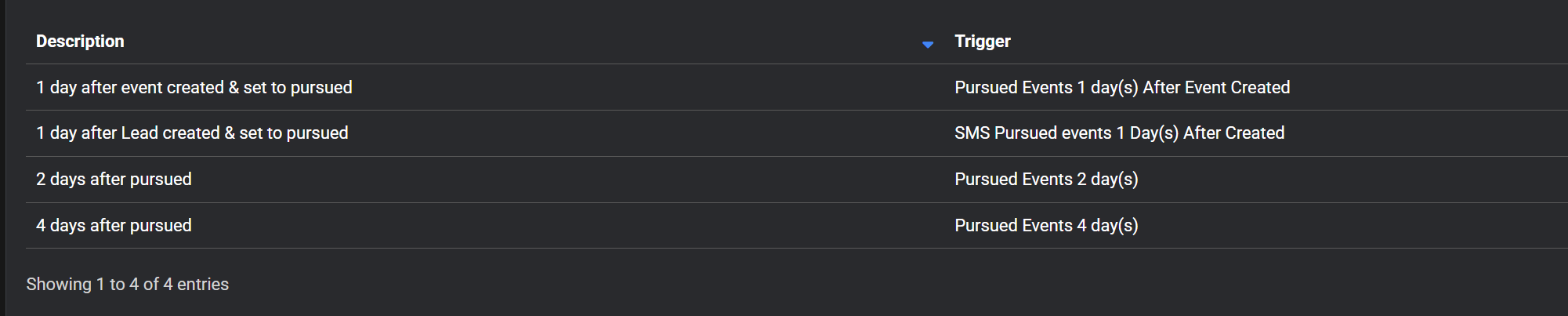
I am not sure what is an is not going out.
Thank
I just noticed that on the ones that work, the EVENT FILTER is set to ALL EVENTS and the ones that doe not work have that blank. The ones that are BLANK, you cannot set it to ALL EVENTS, as if you try, and press save, it does not save. It does say BLANK APPLIES TO ALL EVENTS, so I think this is a big that needs to be resolved. Thank you …